Get photos out of the iPhoto Masters folder by Event
Open an iPhoto library with Show Package Contents, or on a Windows PC, and the photos sit in Masters in folders like 2011/08/14/20110814-153022: the moment they were imported, not the Events you named. The Event names are in the library's database. Library Rescue reads it, so the export comes out as folders like “2011-08-14 Lake trip”.
Drop your iPhoto Library folder here
Read in this browser tab. Nothing is uploaded.
On a Mac? Drag the library here from Finder (Pictures folder).
Free: open and browse any library, and export up to 200 photos per library. Nothing is uploaded.
How to turn the Masters folder into Event folders
Choose the whole library, not Masters
The Event names are in the library's Database folder (or AlbumData.xml in older libraries), not in Masters. Drag the whole “iPhoto Library” onto the box above, or click “Choose library folder” and pick the library itself.
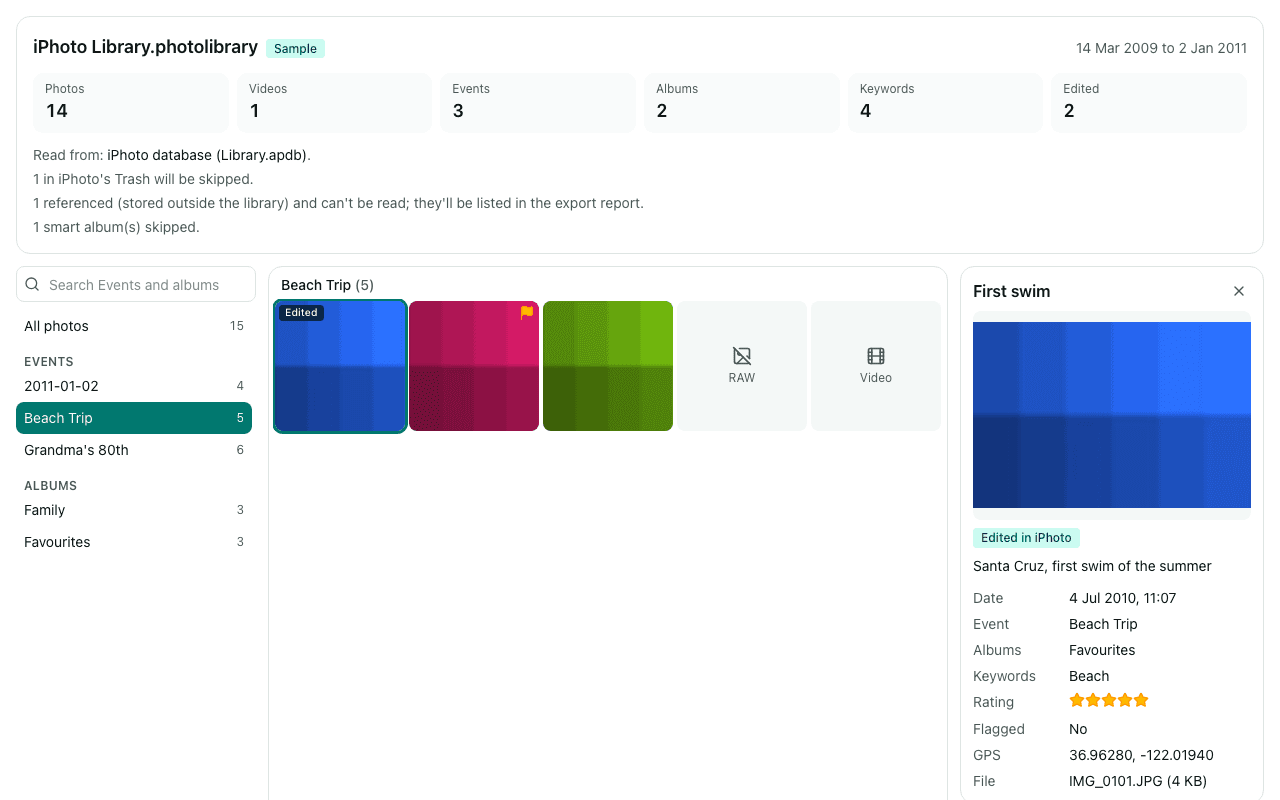
Check the Events
The sidebar lists your Events by name with their photos. If you only see dates, the database couldn't be read and Library Rescue fell back to listing the photo folders. “Copy diagnostics” gives us the library's structure (no names or photos) so we can look into it.
Export into Event folders
Each Event becomes one folder with its original photos, plus an .xmp sidecar per photo for title, caption, keywords and rating. Photos in iPhoto's Trash are skipped, and thumbnails and preview copies are left out.
Don't move or rename anything inside the library's Masters folder: the library's database points at those exact paths. Library Rescue only reads them.
What you'll see
Questions
Why is Masters sorted by date and not by Event?
In iPhoto 9 (iPhoto '11) libraries, each import is filed under Masters by year, month and day, in a folder named after the import time. Events are records in the library's database, so renaming, merging or splitting an Event never moved any files. Older libraries use an Originals folder with year and roll folders named at import, which may not match your Events as you last named them.
I uploaded Masters to Immich or Google Photos and got hundreds of date albums.
Options that turn folders into albums name each album after its folder, and in Masters those are import dates. Export here with Events as folders first, then upload the export folder with the same option, so each album gets an Event name. The free export covers 200 photos per library, so for a large library use it to check the result first.
What are the Previews, Thumbnails and Modified folders?
Copies iPhoto made. In iPhoto 9 libraries, Previews holds edited versions and screen-size copies and Thumbnails holds small ones; older libraries keep edited versions in Modified. Copying everything gives you duplicates and low-resolution copies. Library Rescue exports only the originals; exporting edited versions isn't available yet.
Can I sort the Masters folder into Events myself?
Not from the files alone: nothing inside Masters records which Event a photo belongs to. Scripts on Mac forums read AlbumData.xml to get the Event names. Library Rescue does the same job in the browser, reading the library's database or, in older libraries, AlbumData.xml.
Are my photos uploaded?
No. The library is read inside this browser tab on your own computer, and the export is written straight to your disk. No photo, file name, caption, keyword or location is sent to us. We only log anonymous counts, such as that a library with between 1,001 and 10,000 photos was opened.
Is it free?
Opening and browsing are free with no limit, and you can export up to 200 photos per library for free. Unlimited export isn't available yet; when you reach the limit, the banner has a link to be told when it is.